
Hi everyone! In this article, I’d like to introduce you to YARA rules, which are powerful detection rules widely used in cybersecurity to identify malware and other suspicious patterns.
What are YARA Rules?
YARA rules are pattern-matching rules that help security professionals detect specific characteristics in files, such as malware signatures, suspicious strings, or other indicators of compromise. They’re essential tools in the cybersecurity analyst’s toolkit.
Basic YARA Rule Structure
The best way to learn YARA rules is by examining examples. Let’s start with the fundamental structure:
rule MyRule
{
    strings:
        $text = "malware"

    condition:
        $text
}
How It Works?
- Rule Name: The first line defines the rule name (in this case, “MyRule”)
- Strings Section: Under the “strings” heading, we define the patterns we want to detect. You can specify multiple strings, one after another
- Condition Section: Here we specify when the rule should trigger - in this case, if any of the defined strings are found
Practical Example
Let me demonstrate by creating a YARA file:
ssnrshnn@ittechnetworkk:~/yara_rules$ nano malware.yar

rule MyRule
{
    strings:
        $text = "malware"

    condition:
        $text
}
I’ll create three test files to demonstrate the detection:
ssnrshnn@ittechnetworkk:~/yara_rules$ echo "test check cyber" > file1.txt
ssnrshnn@ittechnetworkk:~/yara_rules$ echo "Dublin Malware emoTeT" > file2.txt
ssnrshnn@ittechnetworkk:~/yara_rules$ echo "Tokyo malicious malware" > file3.txt

ssnrshnn@ittechnetworkk:~/yara_rules$ cat file1.txt
test check cyber
ssnrshnn@ittechnetworkk:~/yara_rules$ cat file2.txt
Dublin Malware emoTeT
ssnrshnn@ittechnetworkk:~/yara_rules$ cat file3.txt
Tokyo malicious malware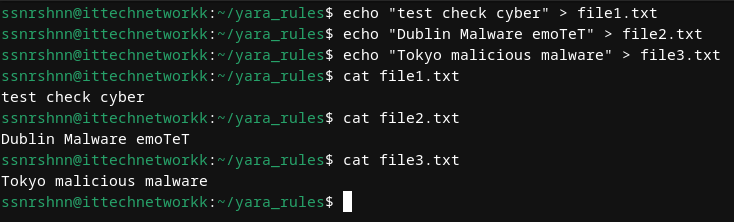
Let’s check our directory structure:
ssnrshnn@ittechnetworkk:~/yara_rules$ ll
total 16
-rw-r--r--. 1 ssnrshnn ssnrshnn 17 Aug 25 23:58 file1.txt
-rw-r--r--. 1 ssnrshnn ssnrshnn 22 Aug 25 23:58 file2.txt
-rw-r--r--. 1 ssnrshnn ssnrshnn 24 Aug 25 23:59 file3.txt
-rw-r--r--. 1 ssnrshnn ssnrshnn 93 Aug 26 00:02 malware.yar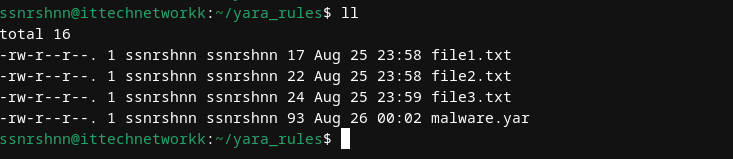
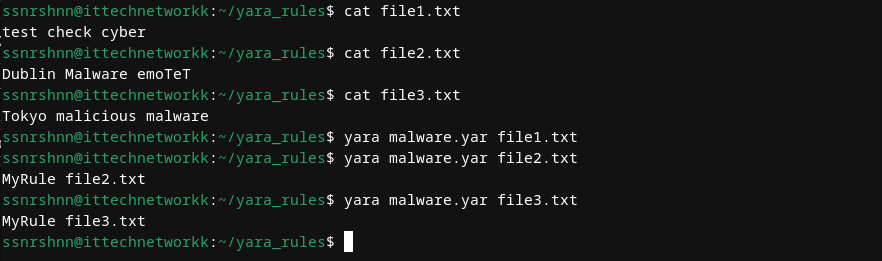
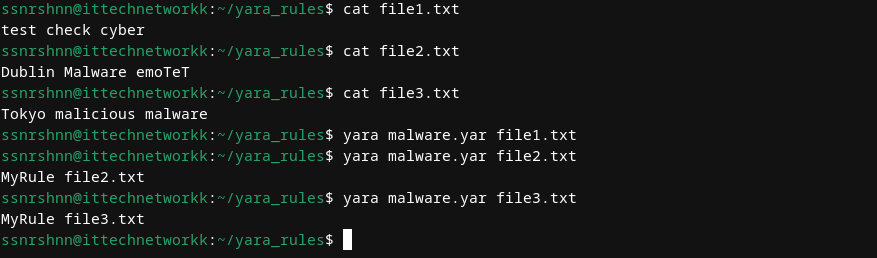
Now let’s test our YARA rule against each file to detect which ones contain the “malware” string:
ssnrshnn@ittechnetworkk:~/yara_rules$ yara malware.yar file1.txt
ssnrshnn@ittechnetworkk:~/yara_rules$ yara malware.yar file2.txt
ssnrshnn@ittechnetworkk:~/yara_rules$ yara malware.yar file3.txt
MyRule file3.txt
Perfect! As you can see, the rule was triggered and we found the matching string in “file3.txt”.
Case Sensitivity
Important Note: YARA rules are case-sensitive by default. Notice that “file2.txt” contains “Malware” (with a capital M), but our rule didn’t trigger because it was looking for “malware” (lowercase).
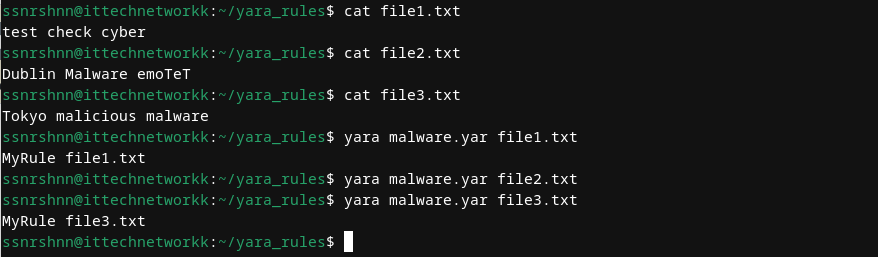
To make the rule case-insensitive, add the nocase modifier:
rule MyRule
{
    strings:
        $text = "malware" nocase

    condition:
        $text
}
Let’s test the case-insensitive version:
Excellent! Now the rule detects both “malware” and “Malware”.
Advanced String Matching
We can create more sophisticated rules by combining multiple strings and using different matching techniques:
rule MyRule
{
    strings:
        $string1 = "london" nocase
        $string2 = "test" nocase
        $hex1 = { 6D 61 6C 77 61 72 65 }     // Hex representation of "malware"

    condition:
        $string1 or $string2 or $hex1
}
In this example, I’ve added three different types of strings:
- Text strings: “london” and “test” (case-insensitive)
- Hexadecimal strings: The hex representation of “malware”
- Logical operators: The “or” condition means the rule triggers if ANY of these strings are found
Regular Expressions and More
Here’s another example demonstrating regular expressions:
rule MyRule
{
    strings:
        $string1 = "london" nocase
        $hex1 = { 65 6D 6F 54 65 54 }    // Hex representation of "emoTeT"
        $regex1 = /malicious/i

    condition:
        $string1 or $hex1 or $regex1
}
Key YARA Keywords
Here are some essential keywords that will be useful for writing rules:
| all | and | any | ascii | at | base64 | base64wide | condition |
|---|---|---|---|---|---|---|---|
| contains | endswith | entrypoint | false | filesize | for | fullword | global |
| import | icontains | iendswith | iequals | in | include | int16 | int16be |
| int32 | int32be | int8 | int8be | istartswith | matches | meta | nocase |
| none | not | of | or | private | rule | startswith | strings |
| them | true | uint16 | uint16be | uint32 | uint32be | uint8 | uint8be |
| wide | xor | defined |
For comprehensive documentation, visit the official YARA documentation.
Real-World Examples
Now let’s examine some advanced rules used in actual cybersecurity scenarios.
Here you can find various rules for both learning and practical use.
Example 1: Ransomware Detection
rule DoublePulsarXor_Petya
{
 meta:
   description = "Rule to hit on the XORed DoublePulsar shellcode"
   author = "Patrick Jones"
   company = "Booz Allen Hamilton"
   reference1 ="https://www.boozallen.com/s/insight/publication/the-petya-ransomware-outbreak.html"
   reference2 = "https://www.boozallen.com/content/dam/boozallen_site/sig/pdf/white-paper/rollup-of-booz-allen-petya-research.pdf"
   date = "2017-06-28"
   hash = "027cc450ef5f8c5f653329641ec1fed91f694e0d229928963b30f6b0d7d3a745"
   hash = "64b0b58a2c030c77fdb2b537b2fcc4af432bc55ffb36599a31d418c7c69e94b1"
 strings:
   $DoublePulsarXor_Petya = { FD 0C 8C 5C B8 C4 24 C5 CC CC CC 0E E8 CC 24 6B CC CC CC 0F 24 CD CC CC CC 27 5C 97 75 BA CD CC CC C3 FE }
 condition:
   $DoublePulsarXor_Petya
}

rule DoublePulsarDllInjection_Petya
{
 meta:
  description = "Rule to hit on the XORed DoublePulsar DLL injection shellcode"
  author = "Patrick Jones"
  company = "Booz Allen Hamilton"
  reference1 ="https://www.boozallen.com/s/insight/publication/the-petya-ransomware-outbreak.html"
  reference2 = "https://www.boozallen.com/content/dam/boozallen_site/sig/pdf/white-paper/rollup-of-booz-allen-petya-research.pdf"
  date = "2017-06-28"
  hash = "027cc450ef5f8c5f653329641ec1fed91f694e0d229928963b30f6b0d7d3a745"
  hash = "64b0b58a2c030c77fdb2b537b2fcc4af432bc55ffb36599a31d418c7c69e94b1"
 strings:
   $DoublePulsarDllInjection_Petya = { 45 20 8D 93 8D 92 8D 91 8D 90 92 93 91 97 0F 9F 9E 9D 99 84 45 29 84 4D 20 CC CD CC CC 9B 84 45 03 84 45 14 84 45 49 CC 33 33 33 24 77 CC CC CC 84 45 49 C4 33 33 33 24 84 CD CC CC 84 45 49 DC 33 33 33 84 47 49 CC 33 33 33 84 47 41 }
 condition:
   $DoublePulsarDllInjection_Petya
}
Notice the meta section, which allows you to provide additional information about the rule, including:
- Description
- Author details
- Company information
- References
- Date
- File hashes
The strings section contains hexadecimal patterns that uniquely identify the malware, making detection possible.
Example 2: Cobalt Strike Beacon Detection
rule CobaltStrikeBeacon
{
    meta:
        author = "ditekshen, enzo & Elastic"
        description = "Cobalt Strike Beacon Payload"
        cape_type = "CobaltStrikeBeacon Payload"
    strings:
        $s1 = "%%IMPORT%%" fullword ascii
        $s2 = "www6.%x%x.%s" fullword ascii
        $s3 = "cdn.%x%x.%s" fullword ascii
        $s4 = "api.%x%x.%s" fullword ascii
        $s5 = "%s (admin)" fullword ascii
        $s6 = "could not spawn %s: %d" fullword ascii
        $s7 = "Could not kill %d: %d" fullword ascii
        $s8 = "Could not connect to pipe (%s): %d" fullword ascii
        $s9 = /%s\.\d[(%08x).]+\.%x%x\.%s/ ascii
        $pwsh1 = "IEX (New-Object Net.Webclient).DownloadString('http" ascii
        $pwsh2 = "powershell -nop -exec bypass -EncodedCommand \"%s\"" fullword ascii
        $ver3a = {69 68 69 68 69 6B ?? ?? 69}
        $ver3b = "iiiiiiiiiiiiiiii"
        $ver4a = {2E 2F 2E 2F 2E 2C ?? ?? 2E}
        $ver4b = "................"
        $a1 = "%02d/%02d/%02d %02d:%02d:%02d" xor(0x00-0xff)
        $a2 = "Started service %s on %s" xor(0x00-0xff)
        $a3 = "%s as %s\\%s: %d" xor(0x00-0xff)
        $b_x64 = {4C 8B 53 08 45 8B 0A 45 8B 5A 04 4D 8D 52 08 45 85 C9 75 05 45 85 DB 74 33 45 3B CB 73 E6 49 8B F9 4C 8B 03}
        $b_x86 = {8B 46 04 8B 08 8B 50 04 83 C0 08 89 55 08 89 45 0C 85 C9 75 04 85 D2 74 23 3B CA 73 E6 8B 06 8D 3C 08 33 D2}
    condition:
        all of ($ver3*) or all of ($ver4*) or 2 of ($a*) or any of ($b*) or 5 of ($s*) or (all of ($pwsh*) and 2 of ($s*)) or (#s9 > 6 and 4 of them)
}
This rule might look complex, but it’s actually quite logical. These strings represent unique characteristics that identify Cobalt Strike Beacon payloads. By understanding how to manipulate conditions, you can create powerful detection rules.
Thank you for taking time to read this article, I hope you will find it helpful.
Keep up the great work!