
Hi everyone! In this article I’ll walk you through installing and configuring Fail2Ban and then show you how to integrate it with Wazuh.
Fail2Ban scans log files for repeated authentication failures and automatically bans the offending IP address. Pairing Fail2Ban with Wazuh gives you centralized visibility over those bans and unbans across all of your monitored hosts.
Installation
Update your package index and install Fail2Ban:
sudo apt update
sudo apt install fail2ban
Verify the installation:
fail2ban-client --versionConfigure the jail
Copy the default configuration so that updates do not overwrite your changes:
sudo cp /etc/fail2ban/jail.conf /etc/fail2ban/jail.localOpen the new file and adjust the SSH jail settings:
sudo nano /etc/fail2ban/jail.local[sshd]
enabled = true
maxretry = 3
findtime = 10m
bantime = 4h
port = ssh
logpath = %(sshd_log)smaxretryis the number of failed attempts before a ban.findtimedefines the window in which the failures must occur (here, 10 minutes).bantimeis the length of the ban (here, 4 hours).
Enable the recidive jail
The recidive jail is a “super ban” that targets repeat offenders. If an IP address is banned multiple times within the defined window, the recidive jail enforces a longer ban.
Add the following section to /etc/fail2ban/jail.local:
[recidive]
enabled  = true
filter   = recidive
logpath  = /var/log/fail2ban.log
bantime  = 1w
findtime = 1d
maxretry = 3
Manage the Fail2Ban service
Restart and enable the service so it starts automatically after reboots:
sudo systemctl restart fail2ban
sudo systemctl enable fail2ban
sudo systemctl status fail2ban
Monitor Fail2Ban activity
Tail the log to watch bans and unbans in real time:
sudo tail -f /var/log/fail2ban.logUseful Fail2Ban commands
Ban an IP manually for the sshd jail:
sudo fail2ban-client set sshd banip 192.168.122.1Remove a ban:
sudo fail2ban-client set sshd unbanip 192.168.122.1Check the status of the sshd jail:
fail2ban-client status sshdIntegrate Fail2Ban with Wazuh
These steps assume that the Wazuh agent is already installed on the host and that you have administrative access to the Wazuh manager.
Agent configuration
Edit /var/ossec/etc/ossec.conf on the agent so that Fail2Ban logs are forwarded to Wazuh:
sudo nano /var/ossec/etc/ossec.confAdd the following block inside the <ossec_config> section:
  <!-- Fail2Ban logs -->
  <localfile>
    <log_format>syslog</log_format>
    <location>/var/log/fail2ban.log</location>
  </localfile>
Restart the agent to apply the change:
sudo systemctl restart wazuh-agentWazuh Manager configuration
Create a custom decoder so Wazuh can parse Fail2Ban events. On the Wazuh manager:
sudo nano /var/ossec/etc/decoders/fail2ban_decoder.xml<decoder name="fail2ban">
<prematch>[\d+]:\s*\w+\s*[\w*]</prematch>
</decoder>
<decoder name="fail2ban">
<parent>fail2ban</parent>
<regex>[(\d+)]:\s*(\w+)\s*[(\w*)]\s*(\w*)\s*(\d+.\d+.\d+.\d+)$</regex>
<order>process_id,log_level,jail,action,srcip</order>
</decoder>Next, define rules that raise alerts when Fail2Ban bans or unbans an IP:
sudo nano /var/ossec/etc/rules/fail2ban_rules.xml<group name="fail2ban,">
<rule id="100200" level="10">
<decoded_as>fail2ban</decoded_as>
<action>Ban</action>
<description>Fail2Ban has banned an IP address: $(srcip) from jail: $(jail)</description>
<group>authentication_failure,</group>
</rule>
</group>
<group name="fail2ban,">
<rule id="100201" level="10">
<decoded_as>fail2ban</decoded_as>
<action>Unban</action>
<description>Fail2Ban: IP $(srcip) unbanned from $(jail)</description>
<group>authentication_success,</group>
</rule>
</group>Reload the manager so the new decoder and rules take effect:
sudo systemctl restart wazuh-managerDemo
After three consecutive failed SSH attempts, Fail2Ban bans the source IP and writes the action to /var/log/fail2ban.log:
root@ubuntu:/home/ubuntu# sudo tail -f /var/log/fail2ban.log
2025-11-07 12:37:03,368 fail2ban.filter         [19120]: INFO    Added logfile: '/var/log/fail2ban.log' (pos = 5028, hash = 7da26e49e5d59ab5d52aa865cdadf09d676ae0d1)
2025-11-07 12:37:03,370 fail2ban.jail           [19120]: INFO    Jail 'sshd' started
2025-11-07 12:37:03,372 fail2ban.jail           [19120]: INFO    Jail 'recidive' started
2025-11-07 12:37:32,273 fail2ban.filter         [19120]: INFO    [sshd] Found 192.168.1.148 - 2025-11-07 12:37:31
2025-11-07 12:37:41,859 fail2ban.filter         [19120]: INFO    [sshd] Found 192.168.1.148 - 2025-11-07 12:37:41
2025-11-07 12:37:45,858 fail2ban.filter         [19120]: INFO    [sshd] Found 192.168.1.148 - 2025-11-07 12:37:44
2025-11-07 12:37:46,031 fail2ban.actions        [19120]: NOTICE  [sshd] Ban 192.168.1.148
2025-11-07 12:37:46,034 fail2ban.filter         [19120]: INFO    [recidive] Found 192.168.1.148 - 2025-11-07 12:37:46
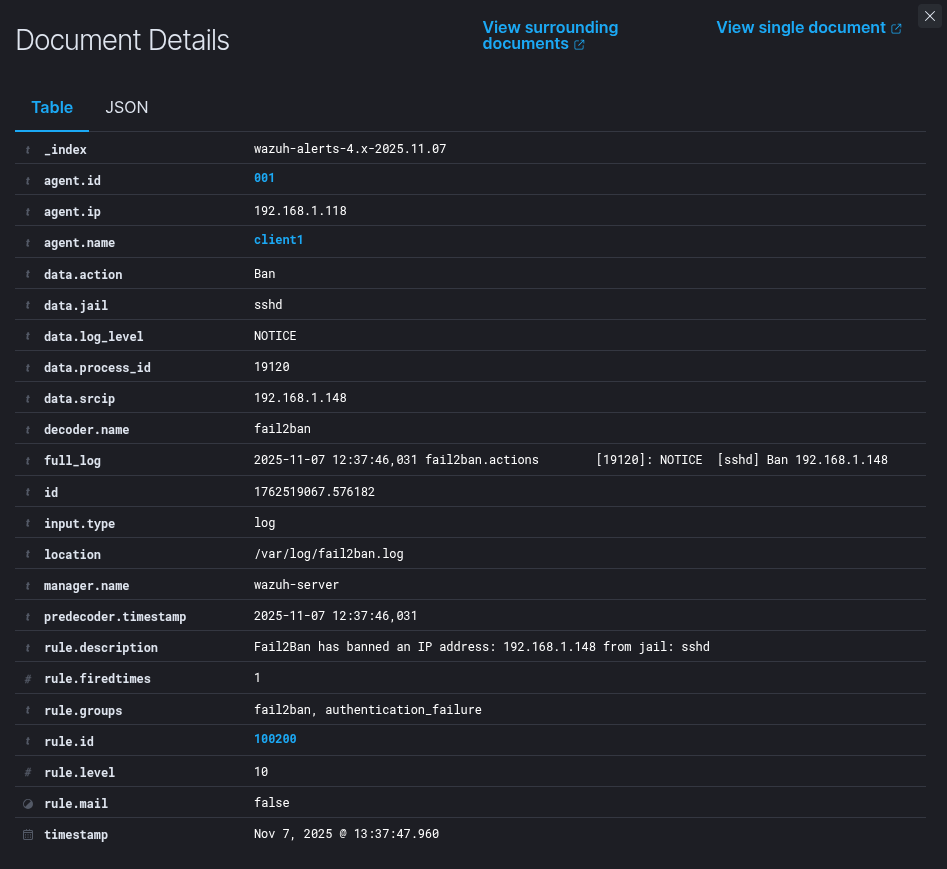
On the Wazuh dashboard you can now visualize the event.

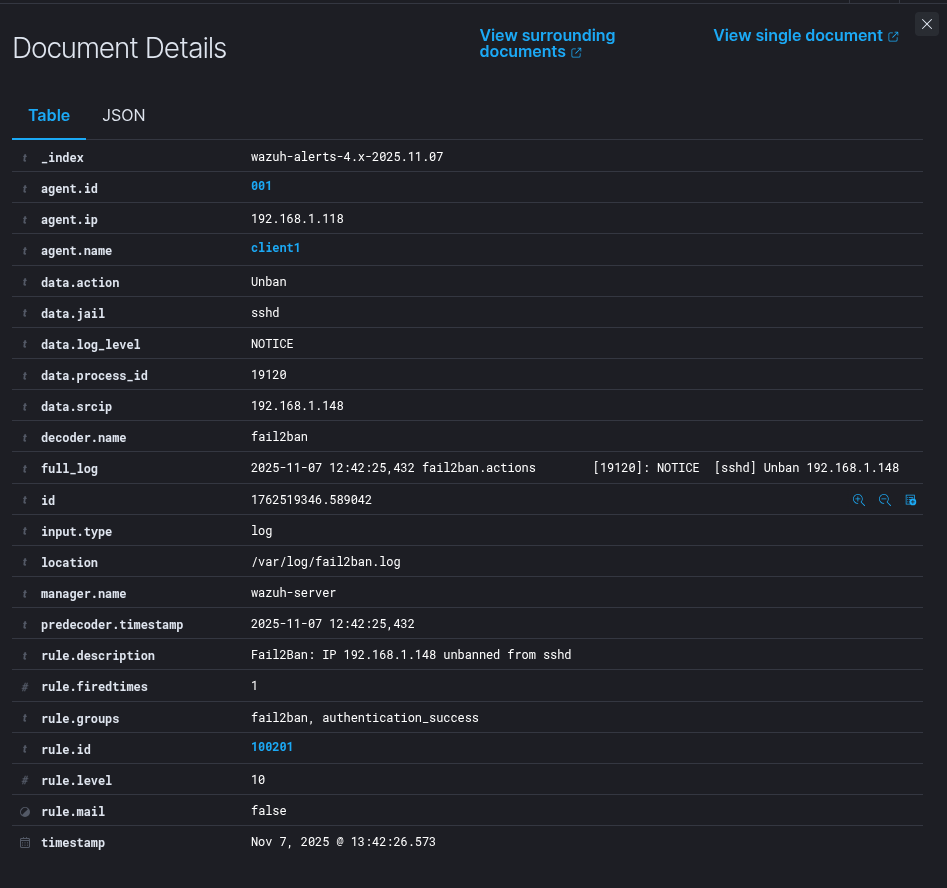
When the IP is unbanned, both Fail2Ban and Wazuh record the action:
root@ubuntu:/home/ubuntu# sudo tail -f /var/log/fail2ban.log
2025-11-07 12:37:03,368 fail2ban.filter         [19120]: INFO    Added logfile: '/var/log/fail2ban.log' (pos = 5028, hash = 7da26e49e5d59ab5d52aa865cdadf09d676ae0d1)
2025-11-07 12:37:03,370 fail2ban.jail           [19120]: INFO    Jail 'sshd' started
2025-11-07 12:37:03,372 fail2ban.jail           [19120]: INFO    Jail 'recidive' started
2025-11-07 12:37:32,273 fail2ban.filter         [19120]: INFO    [sshd] Found 192.168.1.148 - 2025-11-07 12:37:31
2025-11-07 12:37:41,859 fail2ban.filter         [19120]: INFO    [sshd] Found 192.168.1.148 - 2025-11-07 12:37:41
2025-11-07 12:37:45,858 fail2ban.filter         [19120]: INFO    [sshd] Found 192.168.1.148 - 2025-11-07 12:37:44
2025-11-07 12:37:46,031 fail2ban.actions        [19120]: NOTICE  [sshd] Ban 192.168.1.148
2025-11-07 12:37:46,034 fail2ban.filter         [19120]: INFO    [recidive] Found 192.168.1.148 - 2025-11-07 12:37:46
2025-11-07 12:42:25,432 fail2ban.actions        [19120]: NOTICE  [sshd] Unban 192.168.1.148
That’s all.
Thank you for taking time to read this article, I hope you’ll find this article useful.
Keep up the good work!