
ICMP Request and Reply
icmp.type==8                        #Request
icmp.type==0                        #Reply
icmp.type==8 or icmp.type==0        #Both
TCP Flags
URG (Urgent)
ACK (Acknowledgement)
PSH (Push)
RST (Reset)
SYN (Synchronize)
FIN (Finish)
ECN (Explicit Congestion Notification)
SYN Request
tcp.flags.syn==1SYN+ACK Reply
tcp.flags.syn==1 and tcp.flags.ack==1TCP Null Scan
tcp.flags==0x00TCP RST
tcp.flags.reset==1SYN and FIN Flags
tcp.flags==0x003OS Fingerprinting
(tcp.flags==0x02) && (tcp.window_size < 1025)FTP Brute Force
ftp.response.code==220HTTP Response Codes
http.response.code = 200
http.response.code = 404
HTTP Requests
http.requestHTTP Request Method
http.request.method == "POST"
http.request.method == "GET"
HTTP Packet Filter
http contains PNG
http contains MP3
http contains ZIP
HTTP User Agent
http.user.agent == "Mozilla/5.0 (X11; Linux x86_64) AppleWebKit/537.36"HTTP Host
http.host == "abc.com"HTTP Date
http.date == "Wed, 2 Jul 2020 18:55:12 GMT"HTTP Content Type
http.content_type == "application/json"MySQL Success Login
mysql.response_code == 0x00FTP Success Login
ftp.response.code == 200FTP Failed Login
ftp.response.code == 530FTP Success File Process
ftp.response.code == 226FTP Data Processes
ftp-dataARP Request-Reply
arp.opcode == 1                 #ARP Request
arp.opcode == 2                 #ARP Reply
MAC Address Filter
eth.addr==08:00:27:53:0c:baWLAN BSSID Filter
(wlan.bssid == F8:14:FE:4D:E6:F2)WiFi Deauthentication Frames
wlan.fc.type_subtype == 12Rogue Access Point & Evil-Twin Attacks Detection
(wlan.fc.type == 00) and (wlan.fc.type_subtype == 8)

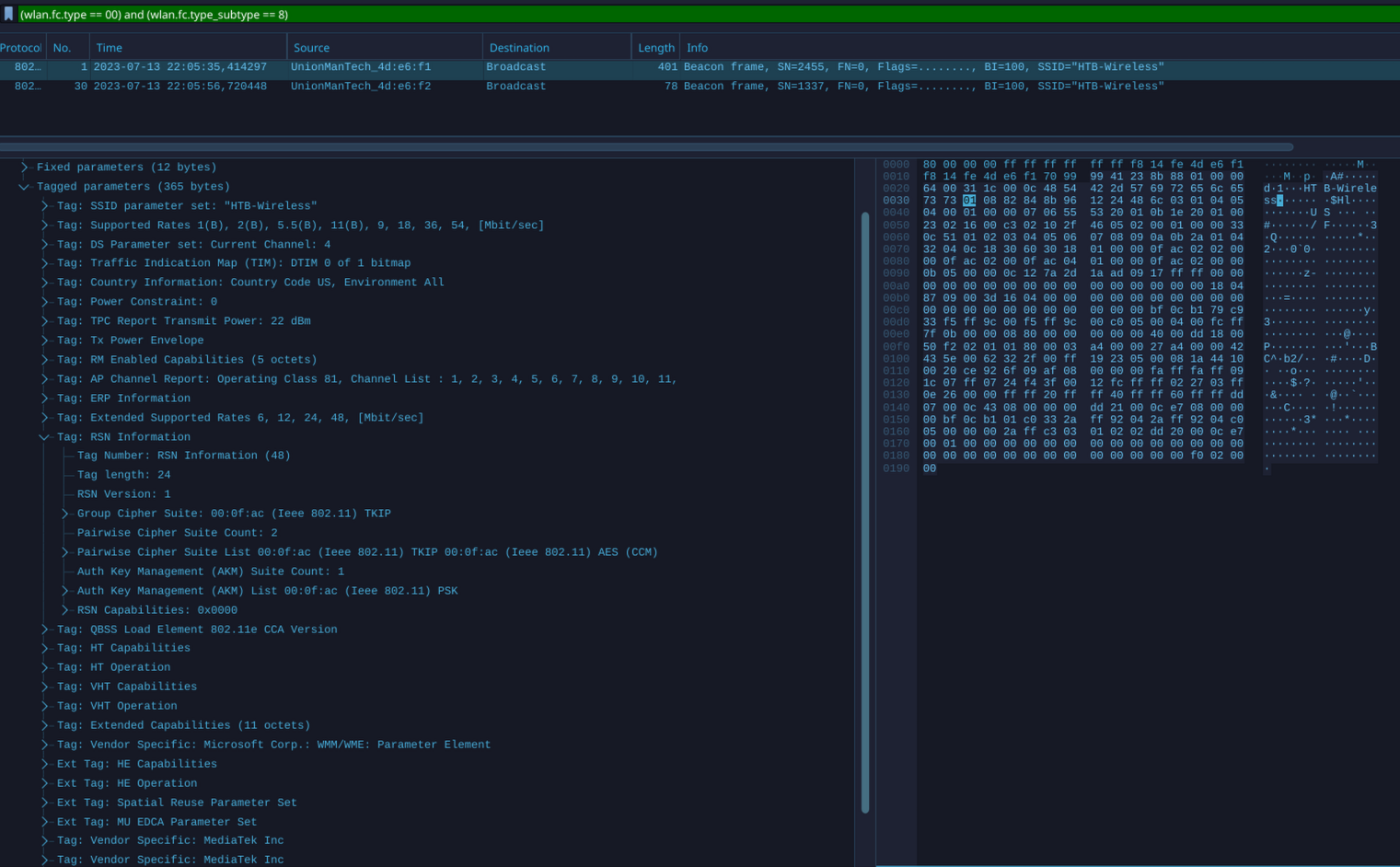
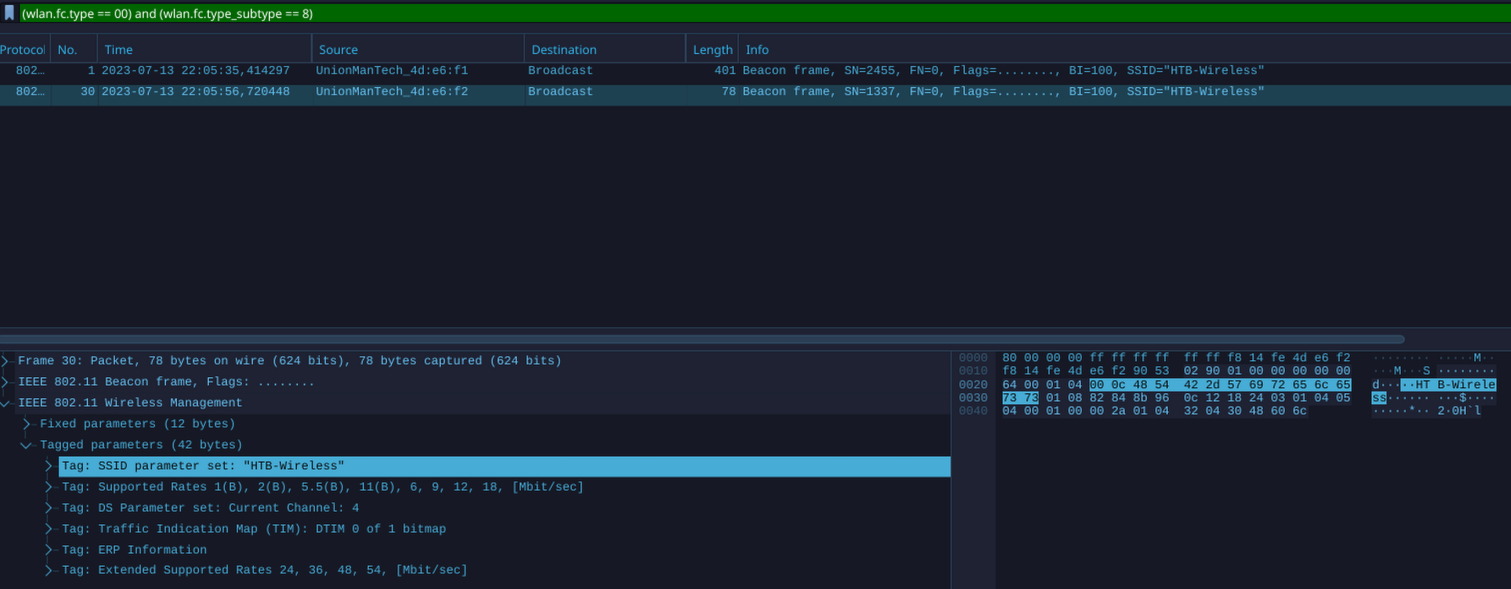
# Beacon analysis is crucial in differentiating between genuine and fraudulent access points. One of the initial places to start is the Robust Security Network (RSN) information. This data communicates valuable information to clients about the supported ciphers, among other things.
Legitimate:
Rogue:
SSL Traffic
ssl.record.content_type == 22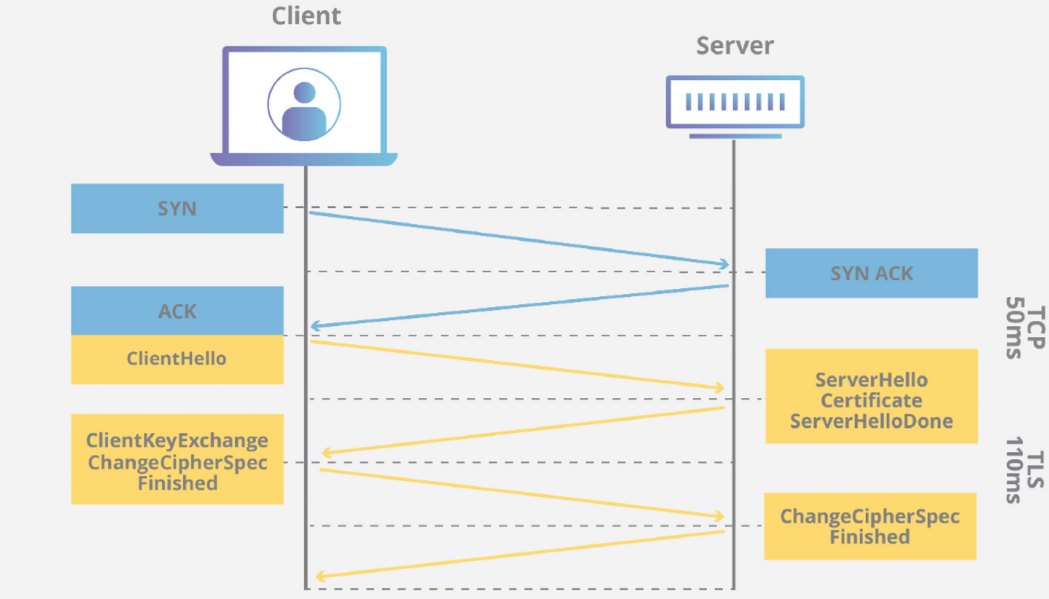
SSL Client Hello Packages
ssl.handshake.type == 1DNS
1. Query Initiation
2. Local Cache Check
3. Recursive Query
4. Root Servers
5. TLD Servers
6. Authoritative Servers
7. Domain Name's Authoritative Servers
8. Response
Record Type
A (Address)|This record maps a domain name to an IPv4 address
AAAA (Ipv6 Address)|This record maps a domain name to an IPv6 address
CNAME (Canonical Name)|This record creates an alias for the domain name. Aka [hello.com](http://hello.com/) = [world.com](http://world.com/)
MX (Mail Exchange)|This record specifies the mail server responsible for receiving email messages on behalf of the domain.
NS (Name Server)|This specifies an authoritative name servers for a domain.
PTR (Pointer)|This is used in reverse queries to map an IP to a domain name
TXT (Text)|This is used to specify text associated with the domain
SOA (Start of Authority)|This contains administrative information about the zoneDNS Query Name
dns.qry.name == "www.google.com"UDP
1. Real-time Applications - Applications like streaming media, online gaming, real-time voice and video communications
2. DNS (Domain Name System) - DNS queries and responses use UDP
3. DHCP (Dynamic Host Configuration Protocol) - DHCP uses UDP to assign IP addresses and configuration information to network devices.
4. SNMP (Simple Network Management Protocol) - SNMP uses UDP for network monitoring and management
5. TFTP (Trivial File Transfer Protocol) - TFTP uses UDP for simple file transfers, commonly used by older Windows systems and others.
.
.
.