Hi everyone, I hope you’re all doing well. In this article, I’ll walk you through Policy-Based Routing (PBR) — what it is, how it works, and when you’d actually use it.
What is Policy-Based Routing?
Policy-Based Routing is a mechanism that allows network administrators to forward packets based on administrator-defined policies rather than destination-IP-only routing table lookups.
| Routing Type | Key Question |
|---|---|
| Standard Routing | Where is this packet going? |
| Policy-Based Routing | Who sent it, what kind is it, and where should it go based on my rules? |
Why Standard Routing Falls Short
A standard router looks only at the destination IP, consults the routing table, and forwards — nothing else. It doesn’t care about the source, the application, the ToS bits, or packet size. This becomes a limitation when you need traffic differentiation, such as sending VoIP over a low-latency link while bulk backups go over a cheaper one.
How PBR Works
PBR intercepts packets before the normal routing lookup and applies a policy through three steps:
- Match — identify traffic using ACLs or prefix-lists (source IP, destination IP, protocol, port, DSCP, packet size, etc.)
- Set — define the action for matched packets (next-hop, interface, VRF, DSCP marking)
- Apply — attach the route-map to an interface (inbound) or globally for locally generated traffic
Traffic that doesn’t match any policy falls back to the normal RIB lookup.
Key Features
Match Criteria (the “if” clause)
- Source and/or destination IP/subnet
- Protocol (TCP, UDP, ICMP)
- Layer 4 ports (HTTP/80, DNS/53, etc.)
- Packet size — useful for differentiating interactive vs. bulk traffic
- DSCP/ToS bits
- Input interface
Set Actions (the “then” clause)
set ip next-hop— override the next-hop gateway (hard override; ignores the RIB)set interface— force traffic out a specific interfaceset vrf— redirect into a different VRF instanceset ip dscp / precedence— mark packets for downstream QoS treatmentset ip default next-hop— only used when no matching route exists in the RIB (soft override)verify-availability— check next-hop reachability before applying the set action
Operational Features
- Per-interface application (inbound only)
- Ordered rule evaluation via sequence numbers (like ACLs)
- Coexists with dynamic routing protocols (OSPF, BGP, EIGRP)
- Integrates with IP SLA for next-hop health tracking
LAB
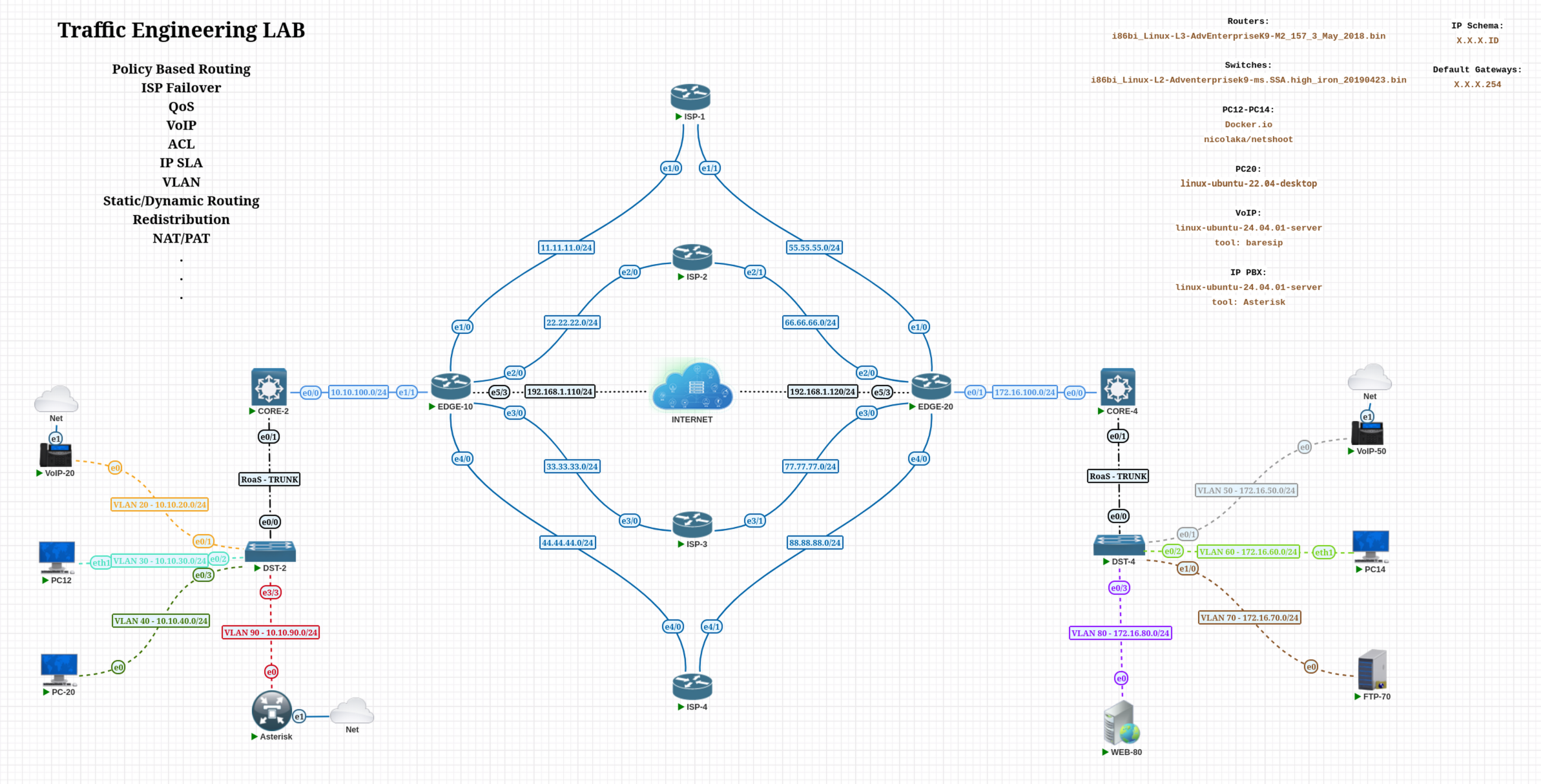
In this lab I’ll cover PBR in detail using an environment that’s well-suited for it.
By default, traffic leaving EDGE-10 toward EDGE-20 is forwarded via ISP-1, which has an AD of 1 (the most preferred static route). ISP-2 is AD 2, ISP-3 is AD 3, and ISP-4 is AD 4.
Conversely, traffic leaving EDGE-20 toward EDGE-10 takes ISP-3 by default (AD 1), with ISP-4 as AD 2, ISP-2 as AD 3, and ISP-1 as AD 4.
EDGE-10 Routing Table:
EDGE-10#sh ip route
Codes: L - local, C - connected, S - static, R - RIP, M - mobile, B - BGP
      D - EIGRP, EX - EIGRP external, O - OSPF, IA - OSPF inter area
      N1 - OSPF NSSA external type 1, N2 - OSPF NSSA external type 2
      E1 - OSPF external type 1, E2 - OSPF external type 2
      i - IS-IS, su - IS-IS summary, L1 - IS-IS level-1, L2 - IS-IS level-2
      ia - IS-IS inter area, * - candidate default, U - per-user static route
      o - ODR, P - periodic downloaded static route, H - NHRP, l - LISP
      a - application route
      + - replicated route, % - next hop override, p - overrides from PfR

Gateway of last resort is 192.168.1.1 to network 0.0.0.0

S*    0.0.0.0/0 [1/0] via 192.168.1.1
     10.0.0.0/8 is variably subnetted, 6 subnets, 2 masks
O        10.10.20.0/24 [110/20] via 10.10.100.2, 00:15:50, Ethernet1/1
O        10.10.30.0/24 [110/20] via 10.10.100.2, 00:15:50, Ethernet1/1
O        10.10.40.0/24 [110/20] via 10.10.100.2, 00:15:50, Ethernet1/1
O        10.10.90.0/24 [110/20] via 10.10.100.2, 00:15:50, Ethernet1/1
C        10.10.100.0/24 is directly connected, Ethernet1/1
L        10.10.100.254/32 is directly connected, Ethernet1/1
     11.0.0.0/8 is variably subnetted, 2 subnets, 2 masks
C        11.11.11.0/24 is directly connected, Ethernet1/0
L        11.11.11.10/32 is directly connected, Ethernet1/0
     22.0.0.0/8 is variably subnetted, 2 subnets, 2 masks
C        22.22.22.0/24 is directly connected, Ethernet2/0
L        22.22.22.10/32 is directly connected, Ethernet2/0
     33.0.0.0/8 is variably subnetted, 2 subnets, 2 masks
C        33.33.33.0/24 is directly connected, Ethernet3/0
L        33.33.33.10/32 is directly connected, Ethernet3/0
     44.0.0.0/8 is variably subnetted, 2 subnets, 2 masks
C        44.44.44.0/24 is directly connected, Ethernet4/0
L        44.44.44.10/32 is directly connected, Ethernet4/0
     55.0.0.0/24 is subnetted, 1 subnets
S        55.55.55.0 [1/0] via 11.11.11.1
     66.0.0.0/24 is subnetted, 1 subnets
S        66.66.66.0 [1/0] via 22.22.22.2
     77.0.0.0/24 is subnetted, 1 subnets
S        77.77.77.0 [1/0] via 33.33.33.3
     88.0.0.0/24 is subnetted, 1 subnets
S        88.88.88.0 [1/0] via 44.44.44.4
S     172.16.0.0/16 [1/0] via 11.11.11.1
     192.168.1.0/24 is variably subnetted, 2 subnets, 2 masks
C        192.168.1.0/24 is directly connected, Ethernet5/3
L        192.168.1.110/32 is directly connected, Ethernet5/3
EDGE-10#
EDGE-20 Routing Table:
EDGE-20#sh ip route
Codes: L - local, C - connected, S - static, R - RIP, M - mobile, B - BGP
      D - EIGRP, EX - EIGRP external, O - OSPF, IA - OSPF inter area
      N1 - OSPF NSSA external type 1, N2 - OSPF NSSA external type 2
      E1 - OSPF external type 1, E2 - OSPF external type 2
      i - IS-IS, su - IS-IS summary, L1 - IS-IS level-1, L2 - IS-IS level-2
      ia - IS-IS inter area, * - candidate default, U - per-user static route
      o - ODR, P - periodic downloaded static route, H - NHRP, l - LISP
      a - application route
      + - replicated route, % - next hop override, p - overrides from PfR

Gateway of last resort is 192.168.1.1 to network 0.0.0.0

S*    0.0.0.0/0 [1/0] via 192.168.1.1
     10.0.0.0/16 is subnetted, 1 subnets
S        10.10.0.0 [1/0] via 77.77.77.3
     11.0.0.0/24 is subnetted, 1 subnets
S        11.11.11.0 [1/0] via 55.55.55.1
     22.0.0.0/24 is subnetted, 1 subnets
S        22.22.22.0 [1/0] via 66.66.66.2
     33.0.0.0/24 is subnetted, 1 subnets
S        33.33.33.0 [1/0] via 77.77.77.3
     44.0.0.0/24 is subnetted, 1 subnets
S        44.44.44.0 [1/0] via 88.88.88.4
     55.0.0.0/8 is variably subnetted, 2 subnets, 2 masks
C        55.55.55.0/24 is directly connected, Ethernet1/0
L        55.55.55.20/32 is directly connected, Ethernet1/0
     66.0.0.0/8 is variably subnetted, 2 subnets, 2 masks
C        66.66.66.0/24 is directly connected, Ethernet2/0
L        66.66.66.20/32 is directly connected, Ethernet2/0
     77.0.0.0/8 is variably subnetted, 2 subnets, 2 masks
C        77.77.77.0/24 is directly connected, Ethernet3/0
L        77.77.77.20/32 is directly connected, Ethernet3/0
     88.0.0.0/8 is variably subnetted, 2 subnets, 2 masks
C        88.88.88.0/24 is directly connected, Ethernet4/0
L        88.88.88.20/32 is directly connected, Ethernet4/0
     172.16.0.0/16 is variably subnetted, 6 subnets, 2 masks
O        172.16.50.0/24 [110/20] via 172.16.100.4, 00:19:03, Ethernet0/1
O        172.16.60.0/24 [110/20] via 172.16.100.4, 00:19:03, Ethernet0/1
O        172.16.70.0/24 [110/20] via 172.16.100.4, 00:19:03, Ethernet0/1
O        172.16.80.0/24 [110/20] via 172.16.100.4, 00:19:03, Ethernet0/1
C        172.16.100.0/24 is directly connected, Ethernet0/1
L        172.16.100.254/32 is directly connected, Ethernet0/1
     192.168.1.0/24 is variably subnetted, 2 subnets, 2 masks
C        192.168.1.0/24 is directly connected, Ethernet5/3
L        192.168.1.120/32 is directly connected, Ethernet5/3
EDGE-20#
Here is what I’ll configure:
1. Source-Based Routing
Send traffic from one subnet out a specific ISP, regardless of the default route.
Traffic originating behind EDGE-10 is currently forwarded via ISP-1 due to its AD value of 1. Let’s override that with PBR.
Goal: All VLAN 30 traffic must leave via ISP-3, with ISP-4 as the backup link.
Important:
set ip next-hopis a hard override — it ignores the RIB and always tries the specified next-hop first, even if that next-hop is unreachable. To get true failover behaviour, useverify-availability(covered in section 6). The example below shows the basic structure; section 6 shows the production-safe version.
! Step 1: Define what traffic to match
ip access-list extended VLAN30-TRAFFIC
 permit ip 10.10.30.0 0.0.0.255 any

! Step 2: Create the route-map
route-map PBR-VLAN30 permit 10
 match ip address VLAN30-TRAFFIC
 set ip next-hop 33.33.33.3 10                                ! Primary → ISP-3
 set ip next-hop 44.44.44.4 20                                ! Backup  → ISP-4

route-map PBR-VLAN30 permit 20                                ! No match → fall to RIB

! Step 3: Apply inbound on the LAN-facing interface
interface e1/1
 ip policy route-map PBR-VLAN30
Test — PC12 (VLAN 30, primary path via ISP-3):
PC12:~# traceroute 172.16.70.70
traceroute to 172.16.70.70 (172.16.70.70), 30 hops max, 46 byte packets
1  10.10.30.254 (10.10.30.254)  1.433 ms  0.912 ms  0.834 ms
2  10.10.100.254 (10.10.100.254)  1.436 ms  1.509 ms  1.099 ms
3  33.33.33.3 (33.33.33.3)  1.934 ms  6.531 ms  1.693 ms
4  77.77.77.20 (77.77.77.20)  2.230 ms  2.529 ms  2.298 ms
5  172.16.100.4 (172.16.100.4)  2.567 ms  2.774 ms  3.264 ms
6  172.16.70.70 (172.16.70.70)  4.235 ms  3.828 ms  3.558 ms
PC12:~#
After shutting down ISP-3, traffic automatically fails over to ISP-4:
PC12:~# traceroute 172.16.70.70
traceroute to 172.16.70.70 (172.16.70.70), 30 hops max, 46 byte packets
1  10.10.30.254 (10.10.30.254)  1.433 ms  0.912 ms  0.834 ms
2  10.10.100.254 (10.10.100.254)  1.436 ms  1.509 ms  1.099 ms
3  44.44.44.4 (44.44.44.4)  1.934 ms  6.531 ms  1.693 ms
4  88.88.88.20 (88.88.88.20)  2.230 ms  2.529 ms  2.298 ms
5  172.16.100.4 (172.16.100.4)  2.567 ms  2.774 ms  3.264 ms
6  172.16.70.70 (172.16.70.70)  4.235 ms  3.828 ms  3.558 ms
PC12:~#
2. Redirect Specific Destination Traffic
Force traffic going to a specific destination through a chosen path.
Goal: Traffic destined for VLAN 60 must go via ISP-4, with ISP-3 as backup. If both are down, fall back to the normal routing table.
ip access-list extended ACL-TO-VLAN60
 permit ip any 172.16.60.0 0.0.0.255

route-map PBR_TO-VLAN60 permit 10
 match ip address ACL-TO-VLAN60
 set ip next-hop 44.44.44.4                   ! Primary → ISP-4

route-map PBR_TO-VLAN60 permit 20             ! Backup → ISP-3
 match ip address ACL-TO-VLAN60
 set ip next-hop 33.33.33.3

route-map PBR_TO-VLAN60 permit 30             ! Catch-all → fall to RIB

interface e1/1
 ip policy route-map PBR_TO-VLAN60
Test — PC12:
PC12:~# traceroute 172.16.60.14
traceroute to 172.16.60.14 (172.16.60.14), 30 hops max, 46 byte packets
1  10.10.30.254 (10.10.30.254)  1.541 ms  0.735 ms  0.701 ms
2  10.10.100.254 (10.10.100.254)  1.332 ms  1.232 ms  1.098 ms
3  44.44.44.4 (44.44.44.4)  2.420 ms  2.165 ms  2.811 ms
4  58585814.bb.online.no (88.88.88.20)  2.628 ms  2.714 ms  2.428 ms
5  172.16.100.4 (172.16.100.4)  2.723 ms  2.594 ms  3.475 ms
6  172.16.60.14 (172.16.60.14)  4.012 ms  3.897 ms  3.737 ms
PC12:~#
3. Protocol-Based Routing
Route UDP and TCP traffic over different paths.
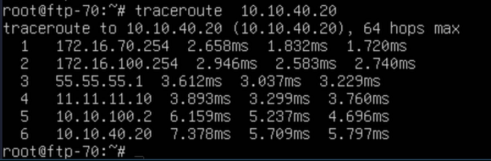
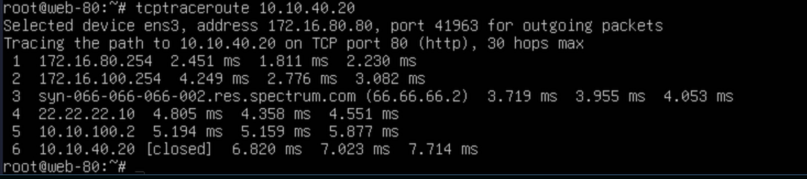
Goal: UDP traffic from VLAN 70 goes via ISP-1 (backup: ISP-2). TCP traffic from VLAN 80 goes via ISP-2 (backup: ISP-1). If both links are down, fall back to the RIB.
Both route-maps are applied on EDGE-20’s LAN-facing interface (e0/1).
! UDP from VLAN 70 → ISP-1 primary, ISP-2 backup
ip access-list extended ACL-VLAN70-UDP-TRAFFIC
 permit udp 172.16.70.0 0.0.0.255 10.10.0.0 0.0.255.255

route-map PBR_VLAN70-UDP permit 10
 match ip address ACL-VLAN70-UDP-TRAFFIC
 set ip next-hop 55.55.55.1                   ! Primary → ISP-1

route-map PBR_VLAN70-UDP permit 20
 match ip address ACL-VLAN70-UDP-TRAFFIC
 set ip next-hop 66.66.66.2                   ! Backup  → ISP-2

route-map PBR_VLAN70-UDP permit 30            ! Catch-all → fall to RIB

interface e0/1
 ip policy route-map PBR_VLAN70-UDP
Test:
! TCP from VLAN 80 → ISP-2 primary, ISP-1 backup
ip access-list extended ACL-VLAN80-TCP-TRAFFIC
 permit tcp 172.16.80.0 0.0.0.255 10.10.0.0 0.0.255.255

route-map PBR_VLAN80-TCP permit 10
 match ip address ACL-VLAN80-TCP-TRAFFIC
 set ip next-hop 66.66.66.2                   ! Primary → ISP-2

route-map PBR_VLAN80-TCP permit 20
 match ip address ACL-VLAN80-TCP-TRAFFIC
 set ip next-hop 55.55.55.1                   ! Backup  → ISP-1

route-map PBR_VLAN80-TCP permit 30            ! Catch-all → fall to RIB

interface e0/1
 ip policy route-map PBR_VLAN80-TCP
Test:
4. Port-Based Routing (Application-Aware)
Route web traffic differently from file transfer traffic.
Goal:
- HTTP (port 80) from PC-20 to WEB-80 → ISP-3 primary, ISP-2 backup
- FTP (port 21) from PC-12 to FTP-70 → ISP-4 primary, ISP-2 backup
- If no match, fall back to the RIB
Note: A Cisco interface can only have one
ip policy route-mapapplied at a time. To handle multiple application types on the same interface, combine all match/set clauses into a single route-map using separate sequence numbers, as shown below.
ip access-list extended ACL-WEB
 permit tcp host 10.10.40.20 host 172.16.80.80 eq 80   ! HTTP from PC-20

ip access-list extended ACL-FTP
 permit tcp host 10.10.30.12 host 172.16.70.70 eq 21   ! FTP from PC-12

route-map PBR-APP permit 10
 match ip address ACL-WEB
 set ip next-hop 33.33.33.3                            ! Web primary → ISP-3

route-map PBR-APP permit 20
 match ip address ACL-WEB
 set ip next-hop 22.22.22.2                            ! Web backup  → ISP-2

route-map PBR-APP permit 30
 match ip address ACL-FTP
 set ip next-hop 44.44.44.4                            ! FTP primary → ISP-4

route-map PBR-APP permit 40
 match ip address ACL-FTP
 set ip next-hop 22.22.22.2                            ! FTP backup  → ISP-2

route-map PBR-APP permit 50                            ! Catch-all → fall to RIB

interface e1/1
 ip policy route-map PBR-APP
Test — Web (PC-20 → WEB-80 via ISP-3):
PC20:~# tcptraceroute 172.16.80.80 80
Selected device eth1, address 10.10.40.20, port 52931 for outgoing packets
Tracing the path to 172.16.80.80 on TCP port 80 (http), 30 hops max
1  10.10.30.254  1.677 ms  1.638 ms  1.616 ms
2  10.10.100.254  2.130 ms  1.857 ms  1.989 ms
3  33.33.33.3   3.179 ms  2.405 ms  2.937 ms
4  58585814.bb.online.no (77.77.77.20)  4.180 ms  3.746 ms  3.402 ms
5  172.16.100.4  4.512 ms  4.977 ms  4.712 ms
6  172.16.70.70 [open]  7.380 ms  6.171 ms  6.213 ms
PC20:~#
Test — FTP (PC-20 → FTP-70 via ISP-4):
PC12:~# tcptraceroute 172.16.70.70 21
Selected device eth1, address 10.10.30.12, port 52931 for outgoing packets
Tracing the path to 172.16.70.70 on TCP port 21 (ftp), 30 hops max
1  10.10.30.254  1.677 ms  1.638 ms  1.616 ms
2  10.10.100.254  2.130 ms  1.857 ms  1.989 ms
3  44.44.44.4  3.179 ms  2.405 ms  2.937 ms
4  58585814.bb.online.no (88.88.88.20)  4.180 ms  3.746 ms  3.402 ms
5  172.16.100.4  4.512 ms  4.977 ms  4.712 ms
6  172.16.70.70 [open]  7.380 ms  6.171 ms  6.213 ms
PC12:~#
5. Packet-Size Based Routing
Differentiate interactive (small) packets from bulk (large) transfers.
route-map PBR-SIZE permit 10
 match length 0 200                      ! Small packets (interactive, DNS, VoIP)
 set ip next-hop 203.0.113.1            ! → Low-latency ISP

route-map PBR-SIZE permit 20
 match length 201 1500                   ! Large packets (bulk data)
 set ip next-hop 198.51.100.1           ! → High-capacity/cheaper ISP

route-map PBR-SIZE permit 30             ! Catch-all → fall to RIB

interface GigabitEthernet0/0
 ip policy route-map PBR-SIZE
6. Next-Hop Tracking with verify-availability
This is the most important PBR feature for production use — it automatically fails over when a primary next-hop becomes unreachable.
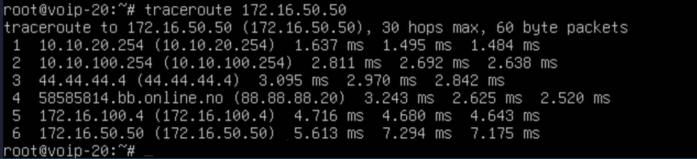
Goal: VoIP traffic from VLAN 20 goes via ISP-4 (primary), ISP-2 (first backup), ISP-3 (second backup). If all three are down, fall back to the RIB.
Important:
set ip next-hopis a hard override — it ignores the RIB and always tries the specified next-hop first, even if that next-hop is unreachable. To get true failover behaviour, useverify-availability.
! IP SLA Probes
ip sla 10
 icmp-echo 44.44.44.4 source-interface e4/0
 frequency 5                                                 ! Probe every 5 seconds
ip sla schedule 10 life forever start-time now

ip sla 20
 icmp-echo 22.22.22.2 source-interface e2/0
 frequency 5
ip sla schedule 20 life forever start-time now

ip sla 30
 icmp-echo 33.33.33.3 source-interface e3/0
 frequency 5
ip sla schedule 30 life forever start-time now

! Track Objects
track 10 ip sla 10 reachability
track 20 ip sla 20 reachability
track 30 ip sla 30 reachability

! VoIP ACL
ip access-list extended ACL-VOIP
 permit ip 10.10.20.0 0.0.0.255 172.16.50.0 0.0.0.255

! Route-map with verify-availability
route-map PBR-VOIP permit 10
 match ip address ACL-VOIP
 set ip next-hop verify-availability 44.44.44.4 10 track 10   ! Primary → ISP-4
 set ip next-hop verify-availability 22.22.22.2 20 track 20   ! Backup  → ISP-2
 set ip next-hop verify-availability 33.33.33.3 30 track 30   ! Backup  → ISP-3

route-map PBR-VOIP permit 20                                  ! Catch-all → fall to RIB

interface e1/1
 ip policy route-map PBR-VOIP
Note: The number after the IP address (
10,20,30) is the sequence number — entries are evaluated in order. Iftrack 10reports down, the router triestrack 20, and so on. If all tracked next-hops are down, the catch-allpermit 20clause lets the packet fall through to the normal RIB lookup.
set ip default next-hopvsset ip next-hop:set ip default next-hoponly kicks in when the RIB has no matching route for the destination. It is not a fallback for whenverify-availabilitytracks fail. Use the catch-allpermitclause (with nosetaction) for RIB fallback.
Test:
7. DSCP Marking + PBR (QoS Integration)
Mark packets with DSCP values and route them — combining PBR with QoS in a single route-map.
ip access-list extended ACL-VOIP-MARK
 permit udp 10.10.20.0 0.0.0.255 any range 16384 32767  ! RTP media ports

ip access-list extended ACL-SIGNALING
 permit tcp 10.10.20.0 0.0.0.255 any eq 5060            ! SIP (TCP)
 permit udp 10.10.20.0 0.0.0.255 any eq 5060            ! SIP (UDP)

route-map PBR-QOS permit 10
 match ip address ACL-VOIP-MARK
 set ip dscp ef                          ! Mark RTP as Expedited Forwarding (DSCP 46)
 set ip next-hop 44.44.44.4

route-map PBR-QOS permit 20
 match ip address ACL-SIGNALING
 set ip dscp cs3                         ! Mark SIP as Class Selector 3 (DSCP 24)
 set ip next-hop 44.44.44.4

route-map PBR-QOS permit 30
 set ip dscp default                     ! All other traffic → best-effort (DSCP 0)

interface GigabitEthernet0/0
 ip policy route-map PBR-QOS
8. Local PBR (Router-Generated Traffic)
Standard PBR only affects transit traffic (packets arriving on an interface and forwarded out another). To apply policy to traffic the router itself generates — such as pings, SNMP traps, BGP updates, and NTP — use ip local policy.
ip access-list extended ACL-ROUTER-MGMT
 permit ip host 10.10.100.254 any           ! Match router's own LAN interface IP

route-map PBR-LOCAL permit 10
 match ip address ACL-ROUTER-MGMT
 set ip next-hop 33.33.33.3                 ! Router's own traffic → ISP-3

! Applied globally — NOT on an interface
ip local policy route-map PBR-LOCAL
Verification & Troubleshooting
! Check whether PBR is applied to an interface
show ip interface e1/1 | include policy

! View route-map sequences, match criteria, and hit counters
show route-map PBR-QOS

! View all PBR policies applied to interfaces
show ip policy

! Verify IP SLA probe results
show ip sla statistics

! Verify track object state (Up/Down)
show track

! Debug PBR decisions in real time (use with caution in production)
debug ip policy

! Reset route-map hit counters
clear route-map counters PBR-QOS
Thanks for taking time to read this article, I hope you found it useful.
Keep up the great work.