
Hello everyone, in this LAB I will configure GRE Tunnels.
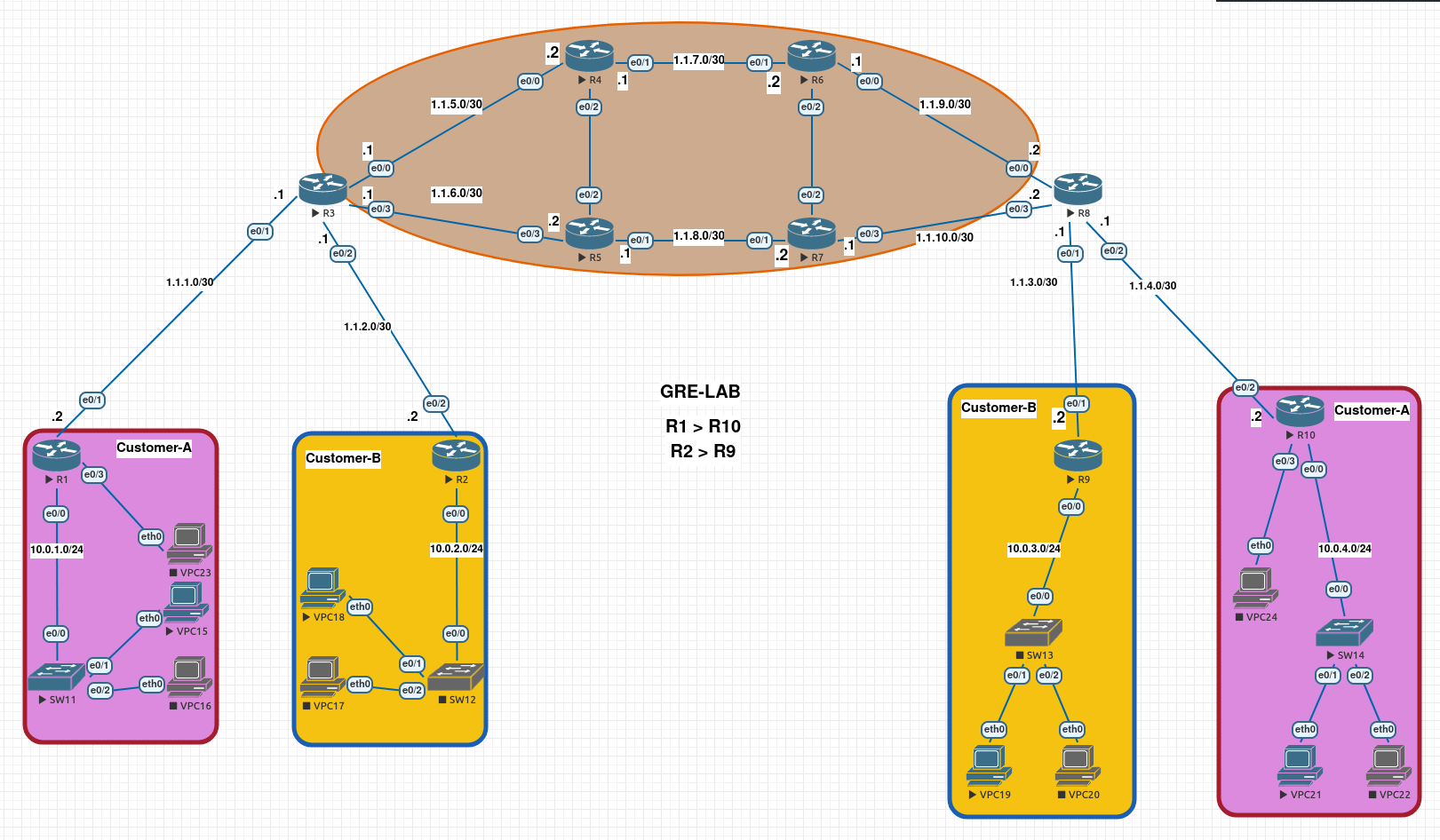
I will implement the following topology. In this topology some configurations have been done. So networks can already reach with each other. I will just focus on GRE Tunnels between the networks of Customer-A and Customer-B.
I will use 192.168.1.0/24 subnet for Customer-A, 192.168.2.0/24 subnet for Customer-B.
R1
#TUNNEL CONFIGURATION
R1>en
R1#conf t
R1(config)#int tunnel 1
R1(config-if)#ip addr 192.168.1.10 255.255.255.0
R1(config-if)#tunnel source e0/1
R1(config-if)#tunnel destination 1.1.4.2
R1(config-if)#exit

#ROUTING
R1(config)#ip route 10.0.4.0 255.255.255.0 tunnel 1
R10
#TUNNEL CONFIGURATION
R10>en
R10#conf t
R10(config)#int tunnel 1
R10(config-if)#ip addr 192.168.1.11 255.255.255.0
R10(config-if)#tunnel source e0/2
R10(config-if)#tunnel destination 1.1.1.2
R10(config-if)#exit

#ROUTING
R10(config)#ip route 10.0.1.0 255.255.255.0 tunnel 1
R2
#TUNNEL CONFIGURATION
R2>en
R2#conf t
R2(config)#int tunnel 1
R2(config-if)#ip addr 192.168.2.10 255.255.255.0
R2(config-if)#tunnel source e0/2
R2(config-if)#tunnel destination 1.1.3.2
R2(config-if)#exit

#ROUTING
R2(config)#ip route 10.0.3.0 255.255.255.0 tunnel 1
R9
#TUNNEL CONFIGURATION
R9>en
R9#conf t
R9(config)#int tunnel 1
R9(config-if)#ip addr 192.168.2.11 255.255.255.0
R9(config-if)#tunnel source e0/1
R9(config-if)#tunnel destination 1.1.2.2
R9(config-if)#exit

#ROUTING
R9(config)#ip route 10.0.2.0 255.255.255.0 tunnel 1
Testing
VPC15 > VPC21
VPCS> trace 10.0.1.10
trace to 10.0.1.10, 8 hops max, press Ctrl+C to stop
 1   10.0.4.1   0.551 ms  0.426 ms  0.372 ms
 2   192.168.1.10   1.658 ms  1.424 ms  1.195 ms
VPC19 > VPC18
VPCS> trace 10.0.2.10
trace to 10.0.2.10, 8 hops max, press Ctrl+C to stop
 1   10.0.3.1   0.349 ms  0.314 ms  0.276 ms
 2   192.168.2.10   1.228 ms  1.305 ms  1.030 ms
Thank you for taking the time to read this article.
Keep up the good work!